
Generate loopable audio from prompts — inside your DAW workflow.
NoirGen is an AI-powered VST3 plugin built for producers who need usable material fast. Set key, BPM, and bar length, generate loopable WAV audio, preview it in the plugin, then save and drag it straight into the session.
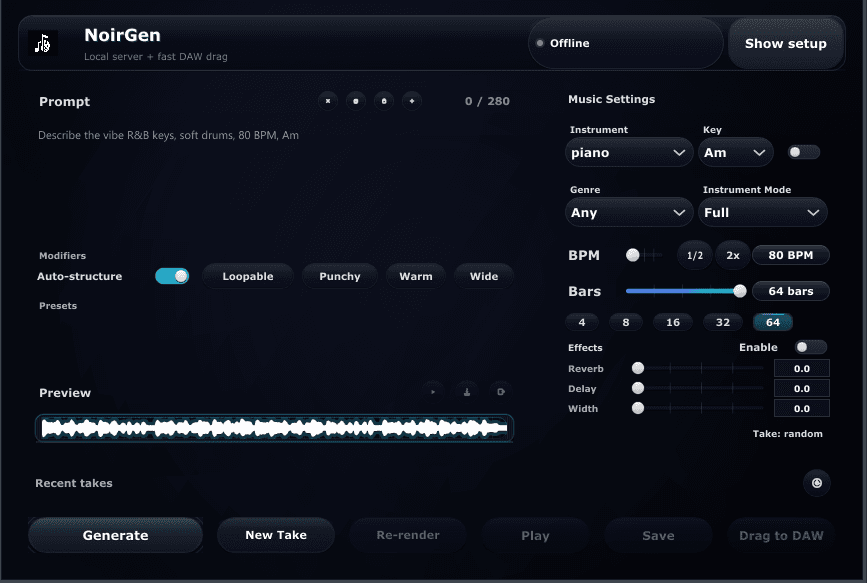
Prompt, generate, preview, and move straight to the arrangement. Built for sessions that need speed without sacrificing control.
Set key, BPM, and bar length before generation so ideas arrive with real project fit from the start.
Generate loopable WAV files you can drag into arrangements, samplers, folders, and sound design chains.
Versioned releases, companion-app workflow, privacy routing, and a one-time purchase model built for adoption.
A tighter path from idea to arrangement. That's the upgrade.
NoirGen replaces tab switching, folder cleanup, and post-generation repair work with a workflow designed to stay inside your DAW.
From scattered workflow to session-ready flow
The value is not hype. It is faster decisions, cleaner handoff into the arrangement, and more usable audio arriving where you can actually work with it.
Stay inside creative flow
NoirGen keeps prompt-to-audio where the work is already happening, so ideas move forward without the usual tab-switching friction.
Get to usable material faster
Musical controls are handled before generation, which means less cleanup, less repair work, and faster decisions inside the session.
Turn good takes into assets
Save strong outputs, revisit them later, and build a repeatable loop workflow instead of losing the best results after one session.
From prompt to arrangement in three steps. No extra context switching.
Set the direction, generate in place, and move the right take into the session.
- 01
Set the musical direction
Write a prompt, choose key, BPM, and bar length, and shape the generation before it starts.
Natural language plus musical controls gives you a faster path to usable output without leaving the DAW workflow.
- 02
Generate and audition in place
Create loopable audio in seconds, then preview it inside the plugin before you commit anything to the arrangement.
Refine the prompt, adjust the settings, and regenerate as needed while keeping your ears and attention on the session.
- 03
Save and drag into the project
Keep the takes that work and move the WAV straight onto the timeline for arranging, chopping, layering, or resampling.
Standard WAV output keeps NoirGen flexible inside real production workflows with no proprietary export layer in the way.
Built for serious sessions. Focused on usable output.
Every feature is there to reduce friction, protect momentum, and get better material from prompt to timeline faster.
Musical parameter control
Dial in key, BPM, and bar length before generation so every take starts with session alignment in mind.
Click for details →Musical parameter control
Choose standard musical keys, set BPM from 60 to 200, and define bar length from 1 to 16 so generated material fits the project more quickly.
← BackLoopable WAV output
Generate loop-ready audio that stays usable across arrangements, samplers, folders, and resampling workflows.
Click for details →Loopable WAV output
Exports standard loopable WAV audio so the result moves cleanly into your production setup without proprietary formats or conversion overhead.
← BackIn-plugin preview
Preview every generation inside the plugin so decisions happen in context, not in a pile of exported files.
Click for details →In-plugin preview
Audition ideas before committing, compare takes faster, and judge what belongs in the project without breaking session momentum.
← BackSave and build a library
Keep the generations worth keeping and turn one-off ideas into a reusable bank of creative material.
Click for details →Save and build a library
Save, organize, and revisit your strongest outputs across sessions so your best takes stay available when a new project needs them.
← BackPlugin + companion workflow
A VST3 plugin paired with a companion app, designed to feel like production software instead of a browser workaround.
Click for details →Plugin + companion workflow
The plugin lives inside your DAW while the companion workflow handles generation alongside it, reducing context switching and keeping the experience productized.
← BackCommercial-ready product
Versioned releases, clean purchase framing, and product signals that make adoption feel grounded and trustworthy.
Click for details →Commercial-ready product
NoirGen is presented with semantic versions, companion-app structure, documented routes, and a one-time license model built for serious use.
← BackTry NoirGen first.
The web demo lets you test the prompt-to-audio concept with no install required. Hear the output, understand the workflow, and decide whether NoirGen belongs in your production setup.
Hear the core concept, test prompt ideas, and make a clean decision on whether the workflow fits your creative process.
The full product adds the faster DAW-native flow: in-plugin preview, saving, drag-and-drop handoff, and better session continuity.
What your purchase includes
One purchase. The core components needed to run NoirGen like a real production tool.
NoirGen VST3 Plugin
Loads in VST3-compatible DAWs as a proper plugin inside your existing production setup.
Companion App
Supports the local NoirGen workflow so generation stays connected to the plugin experience.
Loopable WAV Output
Standard audio you can drag into tracks, samplers, archives, and sound design workflows.
Commercial License
Clear purchase terms for real releases. See /buy for the exact licensing details.
Future Updates
Versioned builds and changelog-based improvements as the product continues to develop.
Built to earn a place in your setup
NoirGen should feel credible before the first generation. These are the product signals that make it easier to trust, install, and keep using.
Designed for real DAW sessions
NoirGen is built to sit beside the arrangement, not outside it. Generate, preview, save, and drag without breaking session flow.
Standard audio output
Loopable WAV output keeps every result usable across arrangements, samplers, resampling chains, and folder-based libraries.
One-time purchase
No recurring subscription, no credit economy, and no artificial usage layer standing between the product and the workflow.
Built for release-minded users
NoirGen is positioned for producers making real work, not for novelty demos or vague AI experimentation outside the studio process.
Versioned like software
Semantic releases, companion-app structure, and clear product routing reinforce that NoirGen is meant to ship, improve, and stay usable.
Trust surfaces in place
Privacy, demo, video, and purchase paths are already part of the product presentation, helping NoirGen feel stable, legible, and ready to adopt.
Common questions
What producers want to know before they install.
What exactly is NoirGen?
Who is it built for?
Which DAWs does it work with?
Can I release music made with NoirGen?
Does it generate full songs?
Is there a way to try it first?
What OS does it support?
Is it a subscription?
Bring prompt-to-audio into the project. Keep the workflow moving.
Try the free web demo first. When you are ready for the full DAW-native workflow with in-plugin preview, saving, and drag-and-drop export, buy NoirGen.